
Built by a Sparky for Sparkies. Join the waitlist

Calendar and dispatch

Plan the week, and let customers book themselves in

Day, week and month views with the forecast on every day. Customers pick a time you're actually free, and repeat work tells you when it's due.

In the app

The Schedule, as it really looks

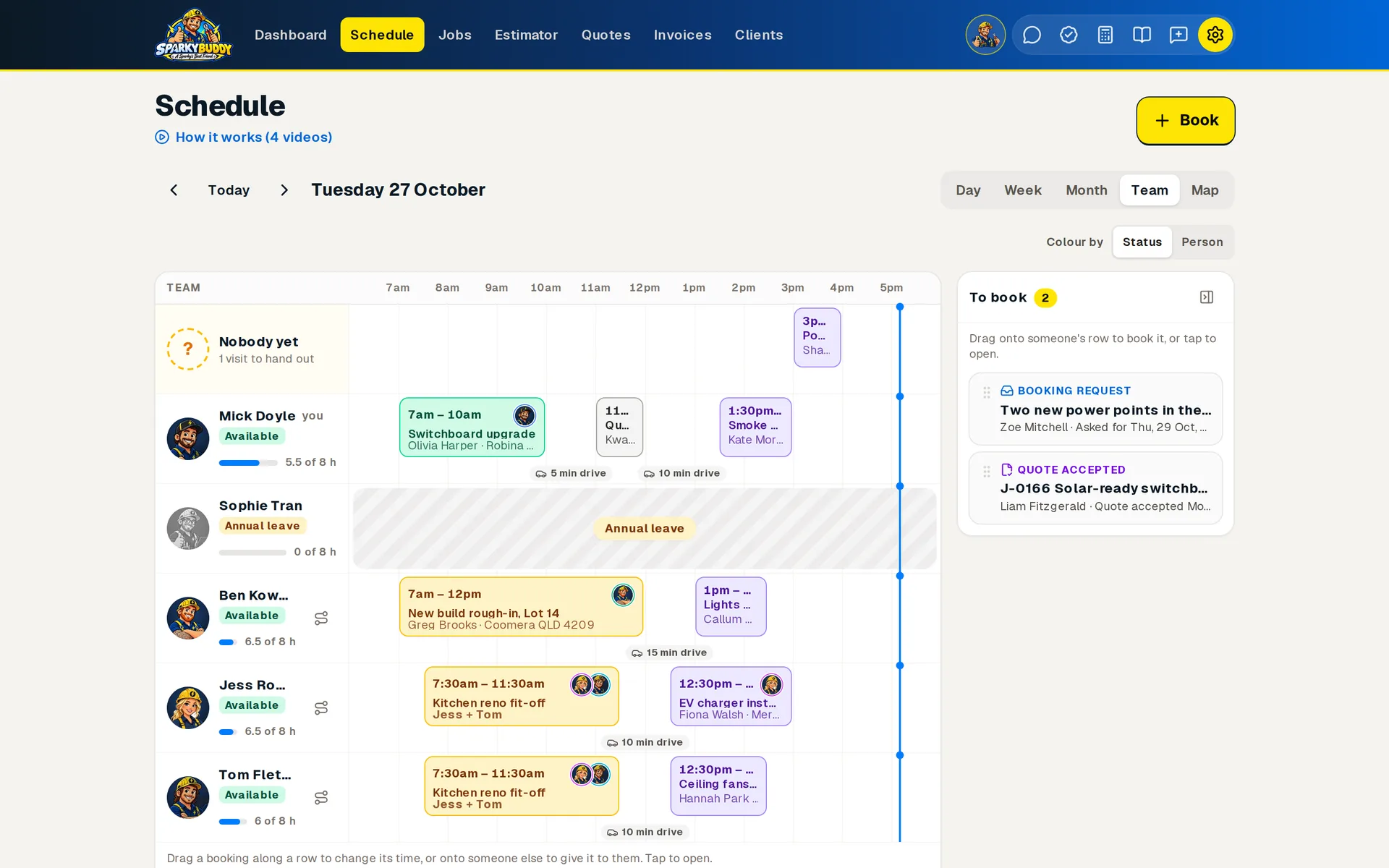
Bookings carry the faces of the people on them. See the day by person with the drive between jobs, the week with the forecast and who's away, or everyone's stops in order.

The Schedule's Team view for one day on a computer: a row for each person with their face, how full their day is and their bookings with the crew's faces and drive times between them, a row for visits nobody has yet, and jobs still to book.
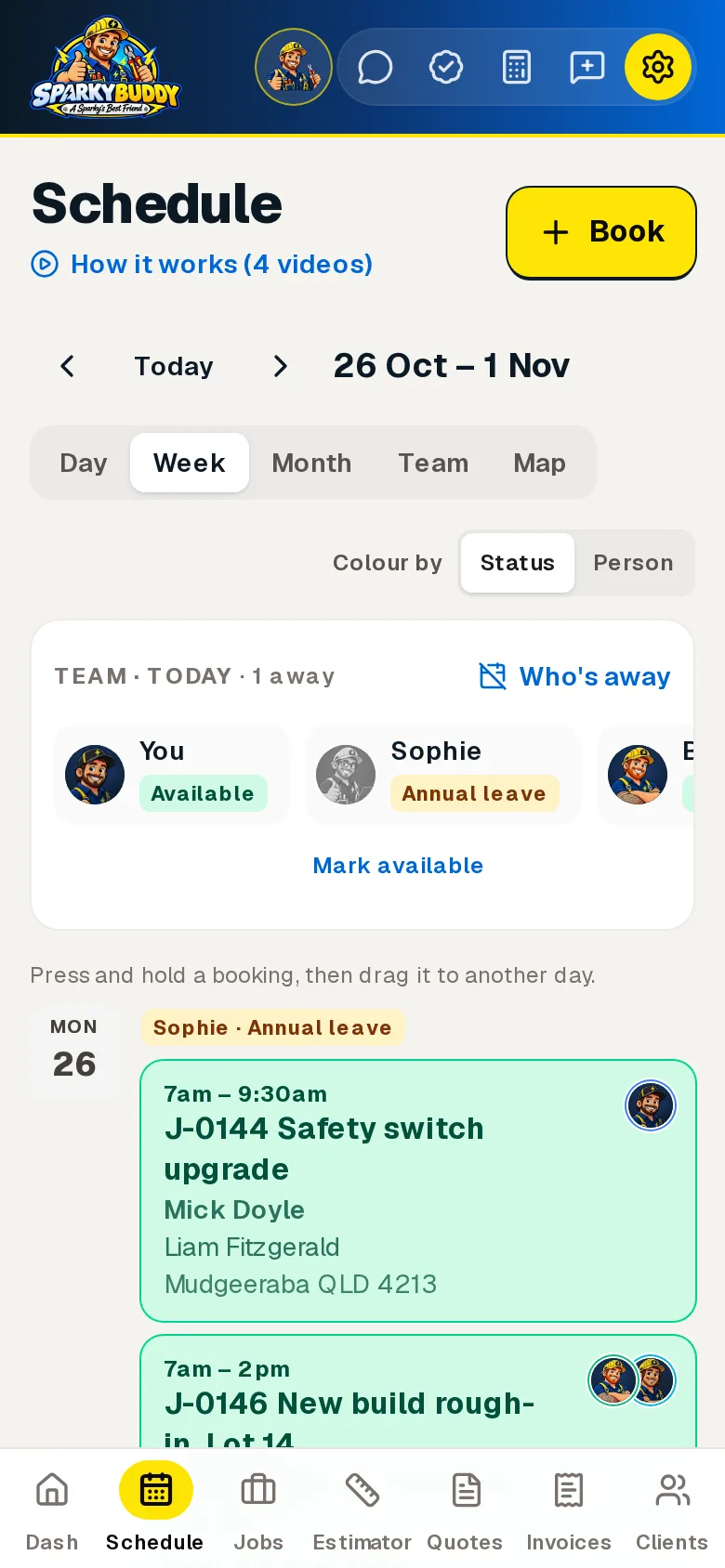
The Schedule's week on a phone: the team's status today, then each day's bookings in a list with the time, job, who's doing it, the client, the suburb and their faces.
The week on your phone, with faces.
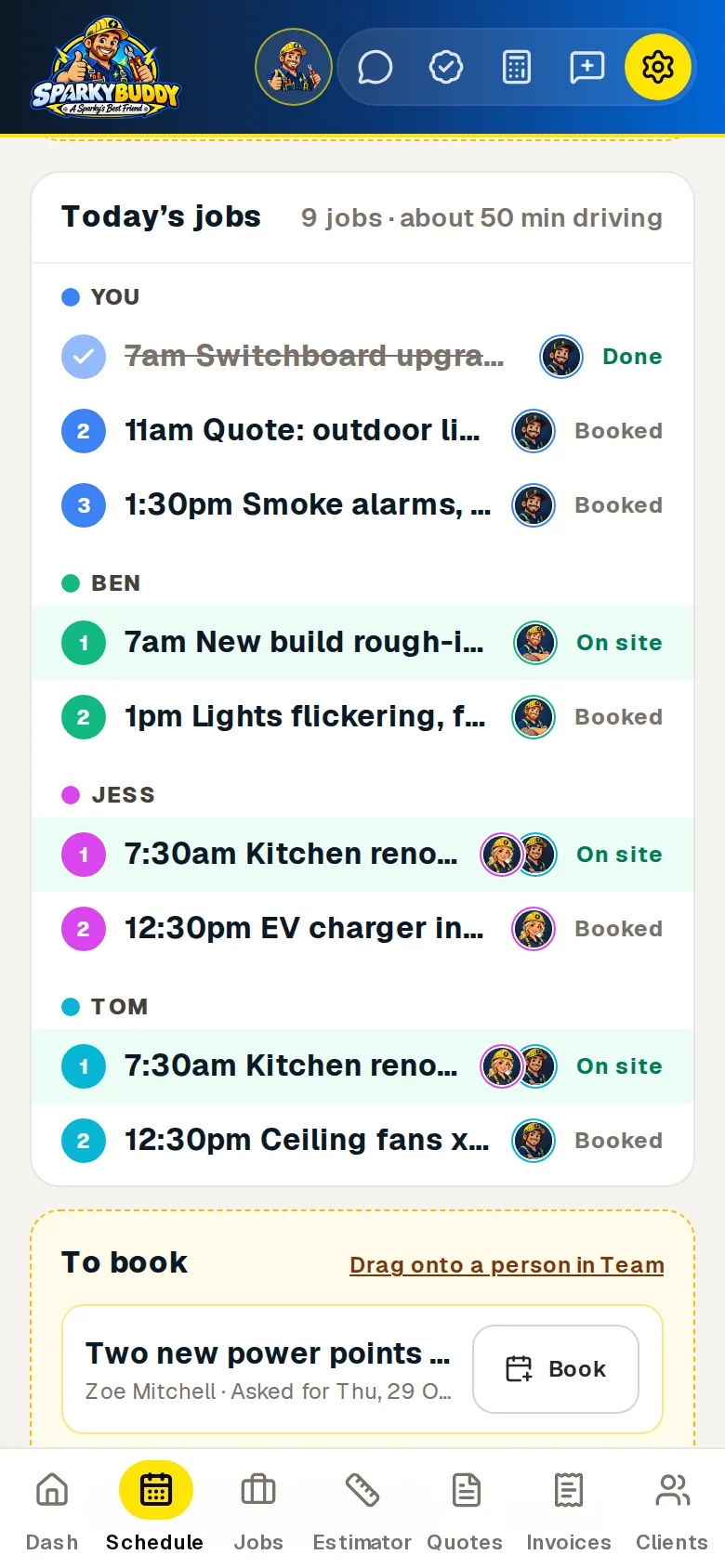
The Schedule's Map view on a phone, with the map itself left out: today's jobs by person, numbered in order, with the faces of who's on each and whether it's done, on site or booked, then a job to book.
Today's stops by person.
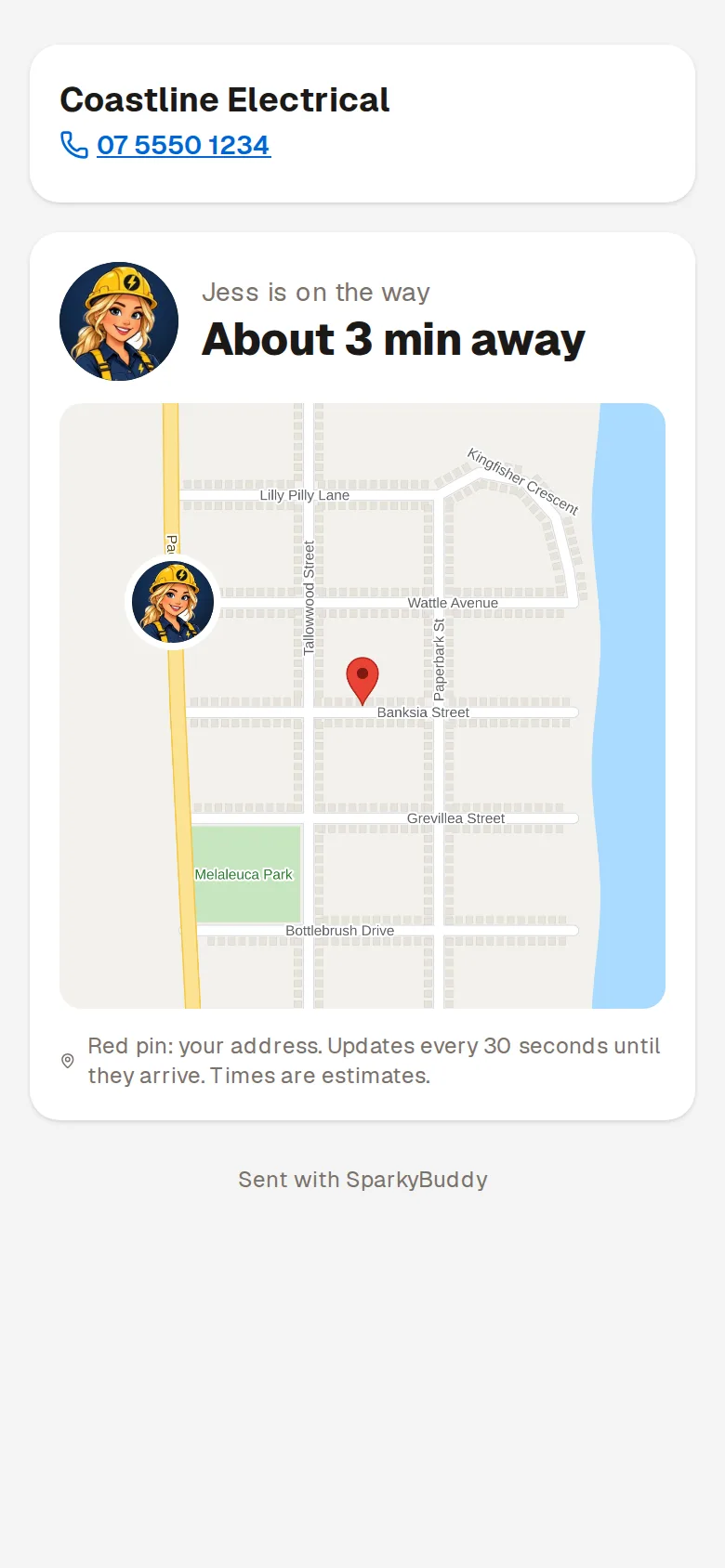
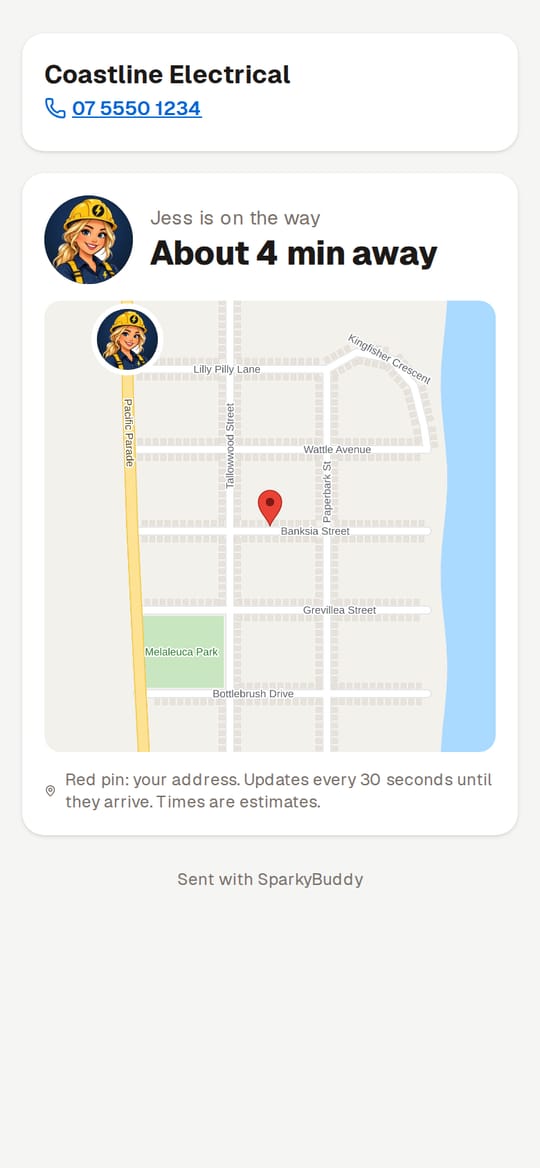
What the customer sees on their phone after On my way: the business name and phone number, Jess's cartoon face with "Jess is on the way" and "About 3 min away", and a map with her face on the road heading towards the red pin on their address.
What your customer sees: who's coming, and when.

Screenshots from the app with a made-up business. The Map view's map itself isn't shown here, and the customer's map is drawn for the demo.

Track my arrival

Your customer sees who's coming before you knock

Tap On my way and your customer gets a text with a link. It shows your face and first name, where you are on a live map, and how long until you get there. When you arrive, it says so.

Demo of the customer's Track my arrival page on a phone: Jess from Coastline Electrical, shown as her cartoon character, is on the way. Her face moves along the map towards the red pin on the customer's address as the time counts down from About 4 min away to Almost there, then the page says Your sparky has arrived.
Demo with a made-up business. The street map is drawn for the demo; the real page shows a Google map.
  • Peace of mind at the doorOlder customers, or anyone home alone, know who's knocking before they open up.
  • No more "Where are you?" callsThey can see you're 10 minutes away, so they don't ring you while you're driving.
  • Looks the partA tidy page with your business name, logo and phone number. On by default, on every plan.
  • Your face is your cartoon character, or a real photo if your business uses them and the person has agreed
  • Only your latest spot is shared, and only from On my way until you arrive
  • After the job, a quick private "How did they go?" rating for the customer (Sparky Plus plan and up)
More about Track my arrival

What you get

Anything marked Coming soon isn't in the app yet.

Live now

Calendar

Day, week and month views, several visits per job (rough-in, fit-off), and personal blocks for time off. Each day shows the forecast.

  • Book a visit when you create the job
  • Start typing an address and pick it from the list
  • Subscribe from your iPhone, Google or Outlook calendar

Watch how it works

Live now

Buddy Smart Planner

Customers book themselves in from your public page. They pick the job and an arrival window, and SparkyBuddy offers the times that suit your day.

  • Only shows windows you're actually free, with travel time kept clear
  • Puts days you're already working nearby first, so you drive less
  • Your quick jobs book straight in; anything else comes to you to confirm

Watch how it works

Live now

Buddy weather

The 7-day forecast on your calendar, and a warning on any roof or outdoor job when the weather at that site crosses your limits.

  • Every day coloured like a traffic light: green for a good day, orange to keep an eye on, red for a bad day on the roof
  • Says what and when, like 80% chance of rain from 11am, or gusts to 45 km/h
  • Set your own limits for rain, wind and heat
  • A heads-up at 4pm the day before, so you can move the job and text the customer in one tap

Watch how it works

Live now

Repeat work

Set what each customer is due for next, like a smoke alarm check, RCD test or test and tag. SparkyBuddy tells you when it's due, ready to text them and book it in.

  • Repeating reminders roll on to the next year by themselves
  • Mark regular customers and their quotes take your loyalty discount off
  • Texts go from your own phone, so they cost nothing

Watch how it works

Live now

For crews

Dispatch board

One day on one screen, with a column for each person, so you can see who's on what. Give a visit to someone else from a dropdown.

  • Visits nobody has yet, and open jobs still to book in, on the same screen
  • Tradies can take an unassigned visit themselves
  • Sparky Plus plan and up

Watch how it works

Live now

On my way

Heading to a job? One tap and pick how long you'll be, and the client gets a text. With a business texting number it sends from there and their reply lands on the job. Without one, your phone's messages app opens with the text ready.

  • Every customer text comes from the same number
  • Works on iPhone and Android

Watch how it works

Live now

Track my arrival

Tap On my way and the customer's text has a link: a map with you on it and "About 14 min away". When you clock on at the job it says your sparky has arrived.

  • Shares only your latest spot, only from the tap until you arrive
  • "Running late? Text them" when you're well past the booked time
  • Stop sharing any time; the link ends after the visit
Live now

For crews

Live team map on the Schedule

Everyone's day on one map: numbered stops in order, the route between them with drive times, and who's on site or driving.

  • Live dots for people clocked on, only while they're clocked on
  • Jobs still to book on the map, with the best free slot suggested
  • Move a visit to someone else from its pin
  • Tradies get their own day as a timeline on their phone, with Navigate
Live now

Time to leave alerts

About 10 minutes before you need to head off, your phone buzzes: "Leave by 10:05am for J-1044, 22 min drive". The same line is on your Dashboard.

  • Worked out from where you are or your last job
  • Everyone on the booking gets one, crew included
  • Switch it off for yourself in Settings

Watch how it works

6 short how-to videos with sound, the same ones you get inside the app. Tap one to watch.

Schedule and bookings

Your week at a glance, booking requests from customers, and On my way texts.

Move a visit to another day

Drag a booking to a new day, and let the customer know in one tap.

Buddy Smart Planner

Customers book an arrival window from your public page, picked to suit your day and your driving.

Buddy weather: roof-day warnings

The forecast on your schedule, and a warning when rain, wind or heat hits a roof or outdoor job.

Repeat work reminders

Smoke alarm checks, RCD tests and test and tag, reminded when they're due.

Dispatch board: who's where today

Everyone's day side by side. Give a visit to someone, or move it to another time.

More of what SparkyBuddy does

Everything on one page

Try it on your next job

SparkyBuddy is launching soon and free during early access. No card needed. Bring your clients across in minutes.